
FlexFlow is a multi-platform desk booking and work availability scheduler. Employees tell the office when they’re coming in, and the app makes sure there’s actually a desk waiting for them when they do.
It runs on the web, on iOS and on Android, all talking to one API. One codebase serves several organisations at once, each on its own subdomain with its own users, desks and locations.
The problem
Hybrid work broke the old seating plan. Half the team is home on Monday, everyone shows up on Tuesday, and the person who arrives last spends twenty minutes looking for a free spot. Spreadsheets and group chats don’t scale, and most off-the-shelf tools are either too heavy or too expensive for a single office.
FlexFlow keeps it small: plan your availability, see who’s in, reserve a desk.
What it does
- Availability planning: mark the days you work from the office, at home, or not at all, including recurring schedules so you don’t have to fill in every week by hand.
- Desk reservations: pick a work location and book a desk that’s guaranteed to be free.
- Groups and teams: see when your colleagues are in, so you can plan office days together.
- Multi-tenant by design: every organisation gets its own subdomain and isolated data.
- Admin dashboard: manage users, groups, locations and desks per tenant, with role-based access for admins and employees.
- Email notifications: transactional mail for accounts and bookings.
- Native mobile apps: a Swift app for iOS and a Kotlin app for Android, next to the Nuxt web app.
Tech stack
| Layer | Technology |
|---|---|
| API | C# · ASP.NET Core · Entity Framework Core |
| Web | Nuxt (Vue) · TypeScript · Pinia |
| Database | PostgreSQL |
| Mobile | Swift (iOS) · Kotlin (Android) |
| Infrastructure | Docker Compose · nginx · Watchtower |
| Testing | .NET unit, integration & functional tests · Playwright end-to-end |
| Tooling | GitHub Actions · Bruno API collections · MailHog |
How it’s built
The ASP.NET Core API is the single source of truth. It’s split into domain, infrastructure and persistence layers, with controllers for auth, tenants, users, groups, work locations, desks and mail. Authentication uses bearer tokens, and the user’s identity comes straight from the token’s claims, so every client ( web, iOS or Android ) authenticates the same way.
On the web side, every request goes through one small API client. It attaches the token, sets the JSON headers and turns failed responses into a predictable error shape, which keeps components free of fetch boilerplate:
web/services/api/client.ts
import { apiClient } from '@/services/api/client';

try {
  const desks = await apiClient.get('/api/desks');
} catch (error) {
  // error.message – human-readable message
  // error.status  – HTTP status code
  // error.data    – extra details from the server
  console.error(error.message);
}
Tenancy is resolved from the hostname. In development that means flexflow.local for the platform and a subdomain per organisation, with api.flexflow.local for the API and mailhog.flexflow.local to catch outgoing mail. nginx routes it all, and local HTTPS is handled with mkcert so the setup matches production as closely as possible.
Why one API for three clients
Building web, iOS and Android against the same contract forced the API to be honest. Anything that was awkward to consume showed up three times, so it got fixed once.
How we approached it
We built FlexFlow in sprints. Each sprint ended with something working that we could show, test and adjust, instead of saving everything up for one big reveal. Over the whole project, that settled into three phases:
- Requirements and the core. We started by gathering requirements and deciding what FlexFlow had to do on day one. The first sprints went into the foundation everything else depends on: the data model, authentication, tenants and the API.
- Design sketch and first UI. With the core in place, we sketched the interface in Figma and started building the screens on top of the working API.
- Iterate on design and implementation. From there, design and code moved together. Every sprint we reviewed what we had built, adjusted the design where it didn’t hold up in practice, and fed those changes straight back into the web and mobile apps.
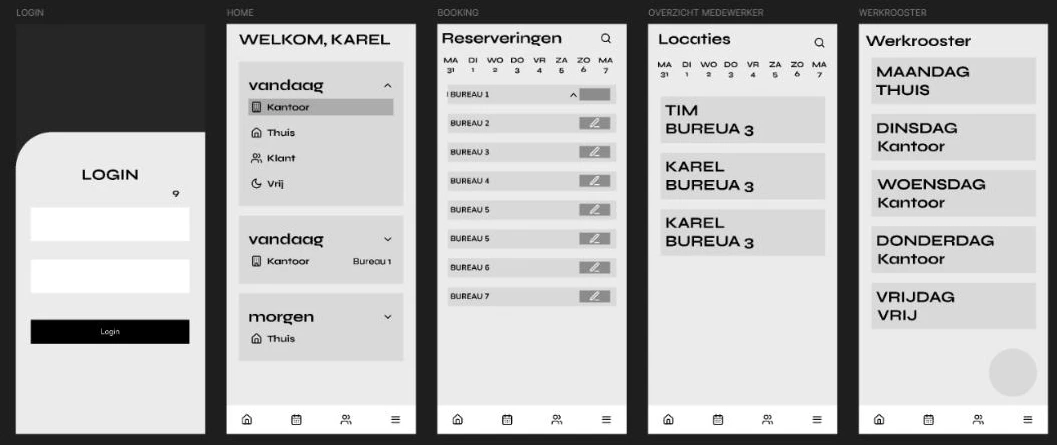
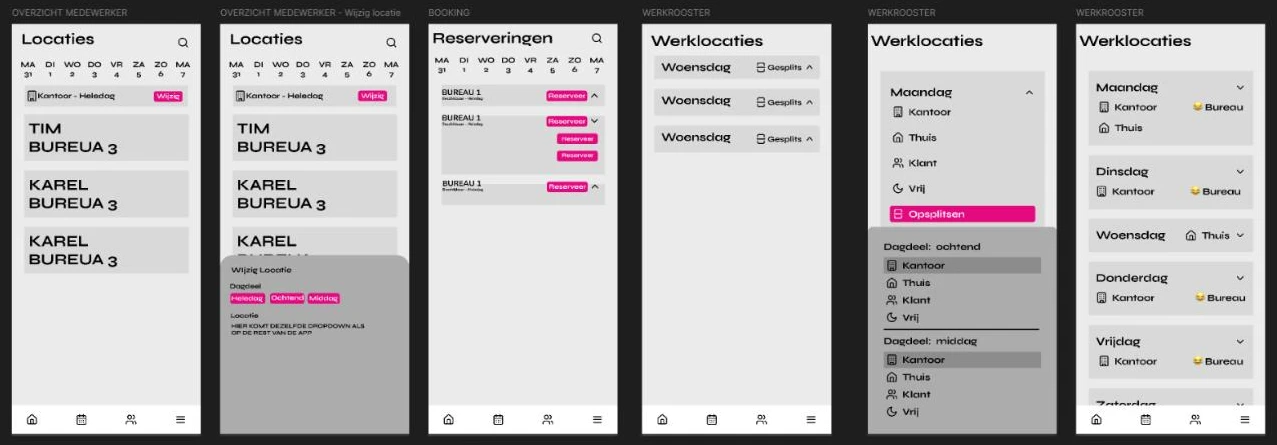
Core first, pixels second
Starting with the API and data model meant the first designs were built against real data, not guesses. That made the design iterations faster, because every change could be tried in the actual app.
Team workflow & quality
FlexFlow was built by a team, and the process was as much a part of the project as the code. Over 1,300 commits went through a Git Flow–style setup:
mainis always deployable;developcollects finished features for integration testing.- Work happens on
feature/*branches; production fixes go onhotfix/*. - Every pull request needs at least one approving review, and hotfixes need sign-off from the architect.
- GitHub Actions run code style and quality checks, unit tests, integration tests and deployment on every change.
- The API is documented and tested with a Bruno collection that lives in the repo, so API docs are reviewed like code.
Running it locally
The whole platform starts with Docker Compose. After generating local certificates with mkcert and adding the *.flexflow.local hosts, it’s one command:
terminal
docker compose up -d

# create and apply a database migration
docker compose exec api dotnet ef migrations add AddDeskTable \
  --output-dir Persistence/Migrations --project=src/FlexFlowApi
docker compose exec api dotnet ef database update --project=src/FlexFlowApi

# run the test suite
dotnet test
What I took away
- Multi-tenancy is a day-one decision. Resolving the tenant from the subdomain early kept data isolation simple instead of bolted on.
- A thin, shared API client pays off fast. One place for auth and errors meant one place to fix bugs.
- Process is a feature. Reviews, branch rules and CI kept a large team shipping without stepping on each other.
- Test at every level. Unit and integration tests guard the API; Playwright end-to-end tests catch what only a real browser sees.